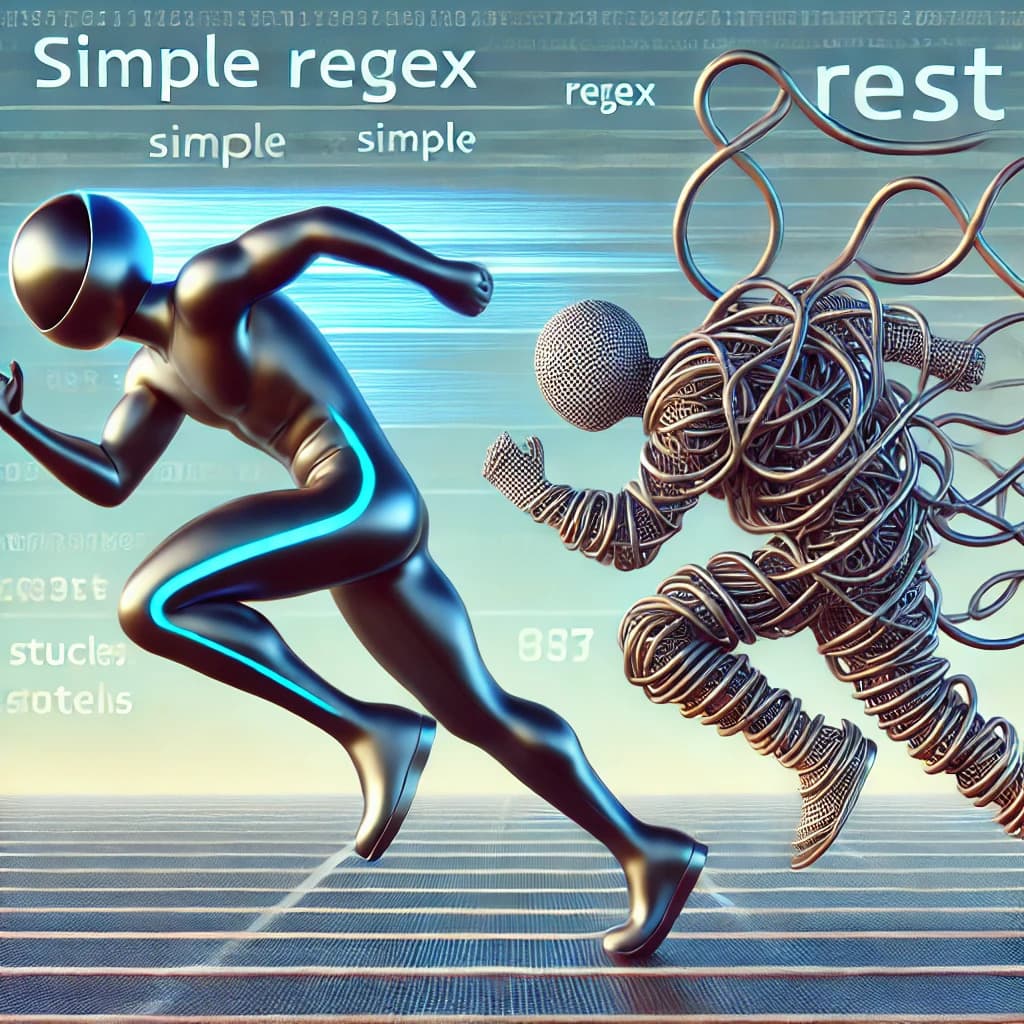

Why Your Node.js App Uses 10× More Memory Than Expected
A single endpoint brought down the server. Learn how buffering large files silently eats memory—and how streaming can cut usage by 10×.
You build a new feature allowing users to download files from your Node.js backend. You test it locally with a few documents (video,audio etc), and it works flawlessly. You push it to production and call it a day.
A few users hit the endpoint, and suddenly:
- RAM usage shot up 📈
- The server slowed down
- Then it crashed
The worst part? The code looked completely normal.
This blog is about why that happens, what mistake causes it, and how a small change can reduce memory usage by 10×.
A Quick Primer: How Node.js Manages Memory
Node.js runs on the V8 engine—the same one that powers Chrome. V8 handles memory for you through garbage collection. When an object is no longer needed, it gets cleaned up automatically.
At least, that's how it should work.
The problem? V8 can only garbage collect objects that nothing in your code references anymore. If something still holds a reference—even by accident—that object stays in memory. That's a memory leak.
V8 also has a hard limit. On 64-bit systems, you get around 1.5GB of heap. Hit that, and your app doesn't slow down. It just crashes.
The Silent Killer: Buffering Large Data
Let's talk about buffering vs streaming—this is where most apps mess up.
Buffering means you read the whole file, hold it in memory, and then send it to the user. Sounds fine, right? But think about it. A 100MB file. Ten users at once. That's 1GB of memory gone. Fifty users? Your server is dead.
Streaming is different. You read the file in small chunks and send each chunk right away. The whole file never sits in memory.
Example
- Buffering is downloading a full movie before watching
- Streaming is watching Netflix while it loads chunk by chunk
The Setup: Two Endpoints, Same File, Same Load
I created a simple Express server with two endpoints:
/download-wrong→ reads the entire file into memory/download-right→ streams the file in chunks
Both endpoints serve the same large MP4 file.
The only difference is how the file is read.
The Wrong Way: Buffering the Entire File
Here's a simple Express endpoint that serves a video file for download:
app.get('/download-wrong', (req, res) => {
  const filePath = path.join(__dirname, 'large-video.mp4');

  fs.readFile(filePath, (err, data) => {
    if (err) {
      return res.status(500).send('Error reading file');
    }
    res.setHeader('Content-Type', 'video/mp4');
    res.send(data);
  });
});
This looks completely reasonable. Read the file, send it to the client. What could go wrong?
What's Actually Happening
When you call fs.readFile(), Node.js loads the entire file into memory before sending a single byte to the client. For a 50MB video file, that means:
- 1 request = 50MB in memory
- 10 concurrent requests = 500MB in memory
- 100 concurrent requests = 5GB in memory
The worst part is that memory doesn’t free immediately. It stays in use until the response is done and garbage collection runs. If requests keep coming, memory keeps getting allocated faster than it’s released.
Benchmarking the Problem
I set up a simple test to see this in action. Using Clinic.js to monitor memory and Autocannon to simulate load:
# Start the server with memory monitoring
clinic doctor -- node index.js

# Simulate 10 concurrent users for 20 seconds
autocannon -c 10 -d 20 http://localhost:3000/download-wrong
The Buffering Approach (Wrong)
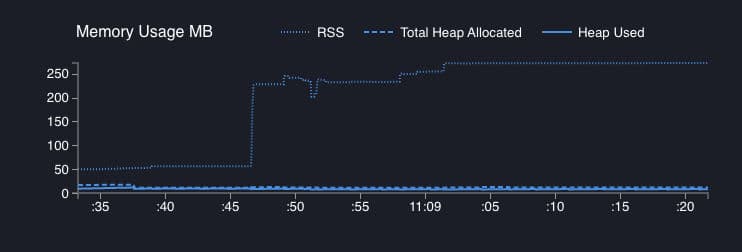
Look at the RSS line. It jumps from baseline to 250MB and just stays there. The Total Heap Allocated keeps climbing in steps—V8 is trying to keep up, but it can't free memory fast enough.
This is memory pressure. If you're running this in a container with a 256MB limit, this single endpoint would trigger an OOM kill.
The Fix: Stream It
Here's the same endpoint, rewritten to use streams:
app.get('/download-right', (req, res) => {
  const filePath = path.join(__dirname, 'large-video.mp4');

  // Check if file exists first
  if (!fs.existsSync(filePath)) {
    return res.status(404).send('File not found');
  }

  res.setHeader('Content-Type', 'video/mp4');
  res.setHeader('Content-Disposition', 'attachment; filename="video.mp4"');

  const fileStream = fs.createReadStream(filePath);
  fileStream.pipe(res);

  fileStream.on('error', (err) => {
    res.status(500).send('Error streaming file');
  });
});
The main difference is that fs.createReadStream() doesn’t load the whole file at once. It reads the file piece by piece (around 64KB at a time) and pipe() immediately pushes each piece to the response. So the file is streamed straight to the client instead of sitting fully in memory.
The Streaming Approach (Right)
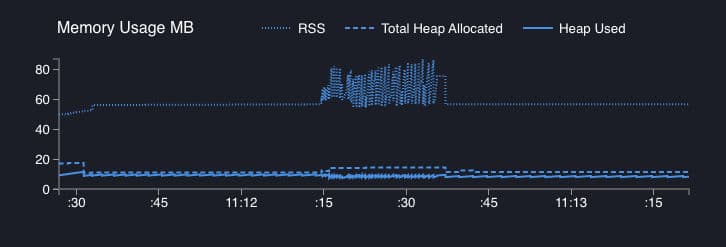
Same test, same load, totally different outcome. RSS stays around 60–80MB with some normal ups and downs, and the heap doesn’t move at all. This endpoint could easily handle 10× more traffic without any stress.
Wrapping Up
Memory issues in Node.js aren't some rare, mysterious bugs. They're usually simple mistakes that add up. A buffered file here, a missing stream there—and suddenly your app is eating 10× more memory than it should.
The fix isn't hard once you know what to look for. Stream your large files. Monitor memory under load. Test with real traffic before you ship.
Your servers (and your DevOps team) will thank you.
👉 GitHub: node-memory-nightmare
Found this helpful? Have you run into memory issues in Node.js? Let me know in the comments.